






- Step 1 First Inter the Token To Your PC
- Step 2 Check the Token Name Like ePass, mToken,proxkey, etc
- Step 3 Download Token Driver Click Here
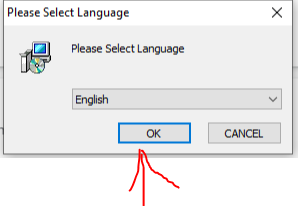
- Step 4 Now Download Java run time 8.0 or the latest version Click Here
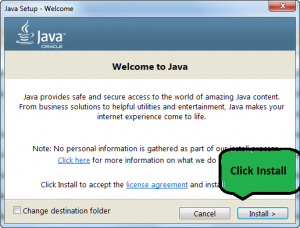
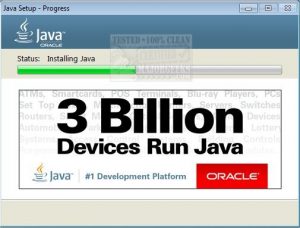
Run Java Wait Until Complet java initialization
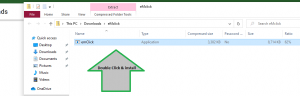
- Step 5 Download eMudhra Utility emClick Click Here
- Step 6 Enter the Application No & Challenge code and Conforme

- Step 7 Enter Your Token Password the Default epass Token password is 12345678
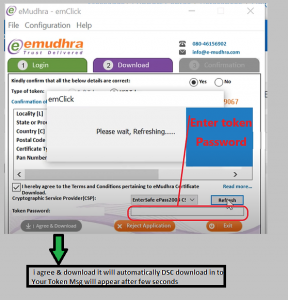
- Step 8 Your eMudhra DSC successfully downloaded

- Step 1 First Inter the Token To Your PC
- Step 2 Check the Token Name Like ePass, mToken,proxkey, etc
- Step 3 Download Token Driver Click Here
- Step 4 Now Download Java run time 8.0 or the latest version Click Here
Run Java Wait Until Complet java initialization
- Step 5 Download Vsign Utility emClick Click Here
- Step 6 Enter the Application No & Challenge code and Conforme
- Step 7 Enter Your Token Password the Default epass Token password is 12345678
- Step 8 Your eMudhra DSC successfully downloaded

- Step 1 First Inter the Token To Your PC
- Step 2 Check the Token Name Like ePass, mToken,proxkey, etc
- Step 3 Download Token Driver Click Here
- Step 4 Now Download Java run time 8.0 or the latest version Click Here
Run Java Wait Until Complet java initialization
- Step 5 Download eMudhra Utility emClick Click Here
- Step 6 Enter the Application No & Challenge code and Conforme
- Step 7 Enter Your Token Password the Default epass Token password is 12345678
- Step 8 Your eMudhra DSC successfully downloaded

- Step 1 First Inter the Token To Your PC
- Step 2 Check the Token Name Like ePass, mToken,proxkey, etc
- Step 3 Download Token Driver Click Here
- Step 4 Now Download Java run time 8.0 or the latest version Click Here
Run Java Wait Until Complet java initialization
- Step 5 Download eMudhra Utility emClick Click Here
- Step 6 Enter the Application No & Challenge code and Conforme
- Step 7 Enter Your Token Password the Default epass Token password is 12345678
- Step 8 Your eMudhra DSC successfully downloaded

- Step 1 First Inter the Token To Your PC
- Step 2 Check the Token Name Like ePass, mToken,proxkey, etc
- Step 3 Download Token Driver Click Here
- Step 4 Now Download Java run time 8.0 or the latest version Click Here
Run Java Wait Until Complet java initialization
- Step 5 Download eMudhra Utility emClick Click Here
- Step 6 Enter the Application No & Challenge code and Conforme
- Step 7 Enter Your Token Password the Default epass Token password is 12345678
- Step 8 Your eMudhra DSC successfully downloaded
